How to Tell If Your Phone Is Hacked (and Exactly What to Do Next)
Most "my phone is hacked" moments turn out to be something else. Here is how to tell the difference, check properly, and secure everything if it is real.
Usama Karim· 10 min read · Updated
Quick answer: Real warning signs include apps you did not install, unknown device management profiles, account login alerts you did not trigger, messages sent from your accounts that you did not write, and sudden loss of mobile service. To check, review installed apps and permissions, look for profiles (iPhone) or device admin apps (Android), run Google Play Protect or Safety Check, and review your Apple or Google account’s signed-in devices. If you find something, change your passwords from a different device, turn on two-factor authentication, update the phone and, if needed, factory reset it.
It is a horrible feeling: your phone is acting strange, a friend says you sent them a weird link, or your battery suddenly dies by noon. Your mind goes straight to “someone hacked my phone”.
Here is the reassuring part. Fully hacking a modern, updated iPhone or Android phone remotely is difficult and expensive, and it is usually aimed at high value targets like journalists and officials. For most people, “my phone is hacked” actually means one of these more common situations:
- An account was compromised (email, Instagram, WhatsApp, Apple ID or Google account), not the phone itself.
- A sketchy app was installed that shows ads, abuses permissions or tracks activity.
- Someone with physical access (a partner, family member or coworker) installed something or knows the passcode.
- A SIM swap moved your phone number to an attacker’s SIM card.
- Nothing is wrong at all, and the strange behavior is a bug, an update or a worn battery.
This guide helps you figure out which one you are dealing with and fix it.
Signs your phone might be compromised
No single symptom proves a hack. What matters is a pattern, especially when several of these show up together and you cannot explain them.
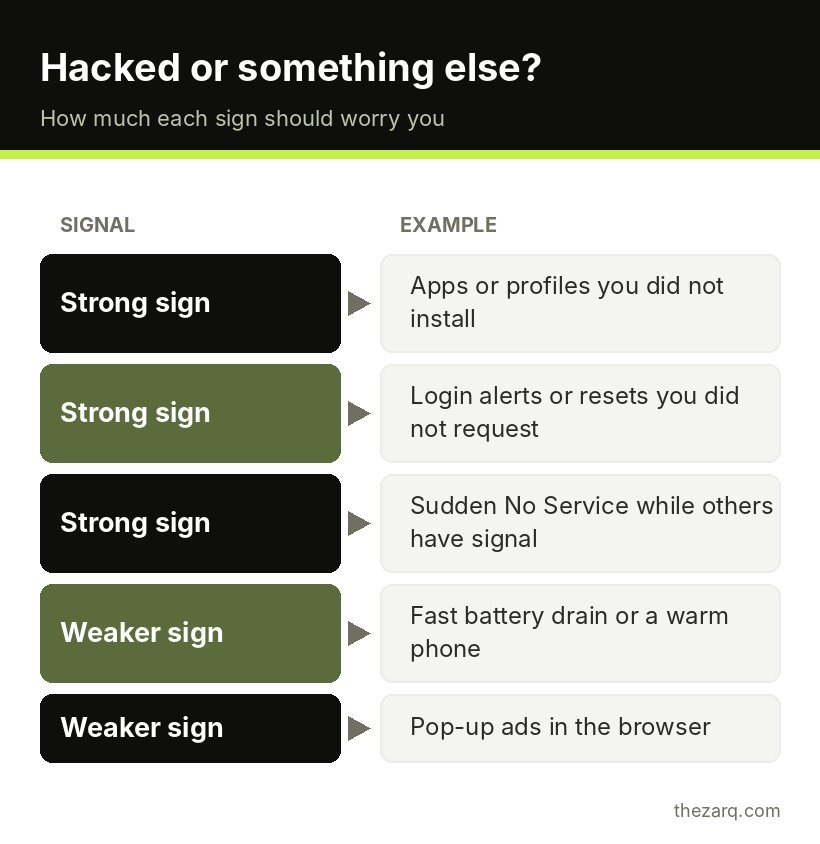
Stronger warning signs:
- Apps on your phone that you did not install.
- A configuration profile or device management entry you did not set up.
- Login alerts or password reset emails you did not request.
- Friends receiving messages or posts from your accounts that you did not send.
- Your phone suddenly showing “No Service” or “SOS only” while others around you have signal. This can indicate a SIM swap.
- Your Apple ID or Google account showing devices you do not own.
- Payments, purchases or bank activity you do not recognize.
Weaker signs (usually something else):
- Battery draining faster than usual. Often an app or an update, not spyware.
- Phone running hot or slow. Usually heavy apps, nearly full storage or age.
- Pop-up ads in the browser. Usually a website or an adware app, not a full compromise.
- Strange noises on calls. Almost always network quality, not someone listening in.
If you only have weaker signs, the phone is probably fine. Still, the checks below are worth doing, because they take 15 minutes and improve your security either way.
How to check an iPhone
Review your apps
Swipe left past your last home screen to the App Library and scroll through everything. Look for apps you do not recognize. Also check Settings > General > iPhone Storage for the full list with last used dates.
Look for device management profiles
Go to Settings > General > VPN & Device Management. On a personal iPhone, this is often empty or lists only a VPN you installed yourself. If you see a configuration profile you do not recognize, tap it to see what it controls. Unknown profiles can route your traffic or install certificates, so remove anything you did not knowingly add. If the phone came from your workplace or school, profiles may be legitimate.
Run Safety Check
Apple built Safety Check for people worried about someone else having access to their devices or accounts. Go to Settings > Privacy & Security > Safety Check. It lets you review who you share location and data with, which apps have access to sensitive permissions, and which devices are signed into your Apple Account. Emergency Reset quickly stops all sharing and signs out other devices if you feel unsafe.
Check devices on your Apple Account
Go to Settings, tap your name, and scroll down to the list of devices. Every device signed into your account appears here. Tap any you do not own and choose Remove from Account, then change your Apple Account password.
Check for jailbreak signs
A jailbroken iPhone has had its security protections removed, which makes spyware much easier to install. Signs include apps like Cydia or Sileo that do not come from the App Store. Updating iOS usually removes a jailbreak.
How to check an Android phone
Run Google Play Protect
Open the Play Store, tap your profile picture, choose Play Protect and tap Scan. Play Protect looks for known harmful apps. It is not perfect, but it catches a lot.
Review installed apps, including hidden ones
Go to Settings > Apps > See all apps. Scroll through slowly. Some stalkerware disguises itself with generic names like “System Service”, “Sync Services” or “Device Health”. If you see something unfamiliar, tap it and check when it was installed and what permissions it has. Search the name online if you are unsure.
Check device admin apps and accessibility services
These two permissions give apps a lot of control, which is why malware loves them.
- Device admin apps: usually under Settings > Security and privacy > More security settings > Device admin apps (the location varies). Only things like Find My Device or a work profile should normally be listed.
- Accessibility: Settings > Accessibility > Installed apps (or Downloaded apps). Accessibility access lets an app read the screen and perform taps. Turn off any app here that you did not intentionally enable for an accessibility reason.
Check “install unknown apps” permission
Go to Settings > Apps > Special app access > Install unknown apps. Any app here with permission can install other apps outside the Play Store. Turn it off for everything unless you have a specific reason.
Review your Google account
Visit your Google Account’s Security section and run the Security Checkup. It shows recent security events, signed-in devices and third-party apps with account access. Remove anything you do not recognize.
Check your accounts, not just the phone
Since most “hacks” are really account takeovers, these checks matter as much as the phone ones:
- Email first. Your email can reset every other password. Check its recent activity and signed-in sessions. In Gmail, scroll to the bottom of the inbox on a computer and click Details next to “Last account activity”.
- Social media and WhatsApp. In WhatsApp, open Settings > Linked devices and log out of anything you do not recognize. Instagram and Facebook have Where you’re logged in lists in their security settings.
- Breach check. Use a reputable breach notification service like Have I Been Pwned to see whether your email appeared in known data breaches. If it did, change that password everywhere you reused it.
Common scams that look like a hack
A lot of scary phone behavior comes from tricks that are annoying but not a true compromise. Recognizing them saves a lot of panic.
Fake virus warnings in the browser. A web page suddenly says your phone has 13 viruses and you must install an app or call a number right now. Phones do not detect viruses through web pages. Close the tab, do not tap anything in the message, and clear that site’s data if it keeps reappearing.
Calendar spam on iPhone. Strange events with links like “Your phone is infected” appear in your calendar. This happens when you accidentally subscribed to a spam calendar. Remove it from the Calendar settings under Accounts > Subscribed Calendars (on recent iOS versions, inside Settings > Apps > Calendar), and delete the subscription.
Notification spam on Android. Constant ads in your notifications from a website usually mean you tapped “Allow” on a site’s notification prompt. In Chrome, go to Settings > Site settings > Notifications and block the offending sites.
Fake delivery and bank texts. Messages claiming a parcel is held or your bank account is locked lead to fake login pages. The danger is entering your details, not receiving the message. If you did enter a password, change it straight away.
Your contacts getting strange messages “from you”. Sometimes this is a hacked account, but often it is spoofing, where scammers make a message look like it came from your number or email without access to your account. Check your sent folder and account activity. If there is nothing there, your account is probably fine.
What to do if your phone or accounts are hacked
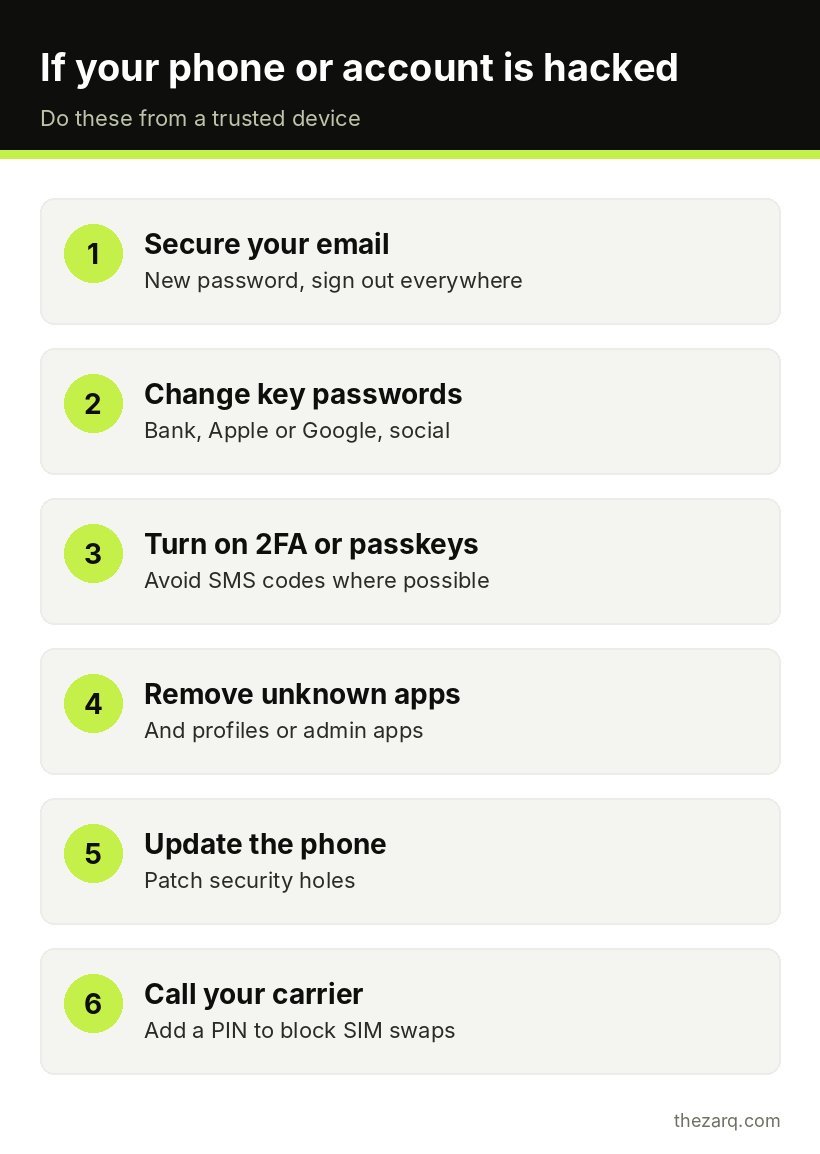
Work through this list in order. Do the account steps from a different, trusted device if you can, so you are not typing new passwords into a phone that might be compromised.
- Secure your email account. Change the password, sign out of all other sessions and turn on two-factor authentication.
- Change passwords for important accounts: banking, Apple or Google account, social media and anything that uses the same password. Use a unique password for each one. A password manager makes this realistic.
- Turn on two-factor authentication everywhere it is offered. Prefer an authenticator app or passkeys over SMS codes.
- Remove unknown apps, profiles and permissions using the checks above.
- Update the phone’s software. Updates patch the security holes attackers use.
- Call your mobile carrier if you lost service unexpectedly. Ask whether a SIM change or port request happened, and add a PIN or passcode to your account to block future SIM swaps.
- Tell your bank if any financial accounts may be affected, and watch your statements for a few weeks.
- Factory reset if you still have doubts. Back up only your photos, contacts and essential files (not apps or full device backups, which could restore a bad app), reset the phone, and set it up as new. Then reinstall apps from the official store only.
- Warn your contacts if messages were sent from your accounts, so they do not click any links.
If you believe someone is tracking you because of a personal safety situation, consider contacting a local domestic violence support organization before removing stalkerware. Removing it can alert the person who installed it, and a support organization can help you plan safely.
About “secret codes” that detect hacking
You might see social media posts claiming that dialing a code like *#21# tells you whether your phone is hacked. Codes like that only show the call forwarding status on many networks. They can reveal if your calls are being forwarded somewhere, which is worth knowing, but they cannot detect spyware or a hacked account.
How to keep your phone from being hacked
These habits block the vast majority of real world attacks:
- Install updates for the phone and apps promptly.
- Only install apps from the App Store or Google Play, and read the permissions.
- Use a strong passcode (six digits or more) and never share it.
- Turn on two-factor authentication or passkeys for important accounts.
- Do not click links in unexpected texts, even if they seem to come from a delivery company or bank.
- Add a PIN to your mobile carrier account.
- Keep Find My (iPhone) or Find My Device (Android) turned on.
Official sources and further reading
The steps in this guide were checked against these official resources. Menus can change between versions, so they are worth a look if something on your screen looks different.
- Safety Check for an iPhone with iOS 16 or later (Apple Personal Safety User Guide)
- Use Google Play Protect to help keep your apps safe (Google Play Help)
- Remove malware or unsafe software (Google Account Help)
Frequently asked questions
Can someone hack my phone just by calling me?
For almost everyone, no. Answering a normal call does not install anything on an updated phone. Rare “zero click” attacks exist, but they are expensive and aimed at specific high value targets. Keeping your phone updated is the best protection against them.
Can my phone be hacked through WiFi?
It is unlikely on modern updated phones when you use secure websites and apps. The main risk on public WiFi is fake login pages or networks set up by attackers. Avoid entering passwords on networks you do not trust, or use mobile data instead.
Will a factory reset remove a hacker?
A factory reset removes apps, profiles and settings from the phone, which gets rid of nearly all malware and stalkerware. It does not fix compromised accounts, so you still need to change passwords and turn on two-factor authentication from a trusted device.
How do I know if someone is tracking my phone location?
Check location sharing in Find My or Google Maps, review apps with location permission, and look for unknown device admin apps or accessibility services on Android. On iPhone, Safety Check shows who you share location with and lets you stop sharing quickly.
Is a hot phone or fast battery drain a sign of hacking?
Usually not. Heavy apps, updates, weak signal and aging batteries cause these far more often. They are only a concern when combined with stronger signs, like unknown apps or account alerts you did not trigger.
Last reviewed on October 31, 2026. Found something outdated or a step that did not work for you? Tell me and I will update the guide.