PHP2Shell: What WordPress Site Owners Need to Do Right Now
Two critical PHP flaws are being exploited in the wild and they affect almost every WordPress site. Here is a plain English checklist to check, patch and verify your site.
Usama Karim· 9 min read
Quick answer: PHP2Shell is the name for two critical PHP vulnerabilities, CVE-2026-109618 and CVE-2026-109619, that let an attacker run code on a web server without logging in. They are being actively exploited, and CISA added them to its Known Exploited Vulnerabilities list on October 26, 2026. If your WordPress site runs on PHP, check your PHP version under Tools > Site Health > Info > Server. You are safe from these two flaws only if you are on PHP 8.5.12, 8.4.27, 8.3.36, 8.2.35 or later in each branch, or on a host that has applied the patched packages. If you are on PHP 8.1 or older, move to a supported version now.
I build and maintain WordPress sites for clients, so I have been following this one closely. Security researchers at Wiz called these findings among the most severe vulnerabilities ever found in PHP, and well-known researcher Kevin Beaumont said it will lead to “a mass of incidents”.
The good news: for most WordPress site owners, the fix is straightforward. You need to confirm which PHP version your site runs, update it if needed, and check that nothing suspicious happened before you patched. This guide walks through each step without assuming you are a server administrator.
What is PHP2Shell?
PHP is the programming language WordPress is written in. Every time someone visits a WordPress page, the server runs PHP to build that page. PHP2Shell is a pair of bugs in PHP itself, not in WordPress, a theme or a plugin. That is why it is so widespread.
The two vulnerabilities are:
| CVE | What goes wrong | Severity |
|---|---|---|
| CVE-2026-109618 | When PHP runs out of memory while request data is only partly set up, cleanup code can treat broken data as valid. This can be abused to run code. | CVSS 4.0 score 9.2 (critical) |
| CVE-2026-109619 | State left over from one request can point to memory that has already been freed, and a later request on the same PHP worker can use it. This can leak memory and lead to code execution. | CVSS 4.0 score 9.2 (critical) |
Both can be triggered remotely by an attacker who is not logged in. A working exploit has shown that a single request can trigger the attack before any of the website’s own code runs. That means a perfectly up to date WordPress install, with only trusted plugins, is still exposed if the PHP underneath is vulnerable.
Which servers are affected?
According to the PHP project and security researchers, every PHP installation that serves web requests is at risk, including:
- PHP-FPM, the most common setup on modern hosting
- Apache with mod_php, which researchers consider the highest risk setup
- php-cgi
- FrankenPHP
- LiteSpeed, used by many shared hosts
Security firm Censys estimated that more than 32 million PHP services were still running an affected version shortly after disclosure.
Fixed versions
PHP released fixed versions on October 21, 2026:
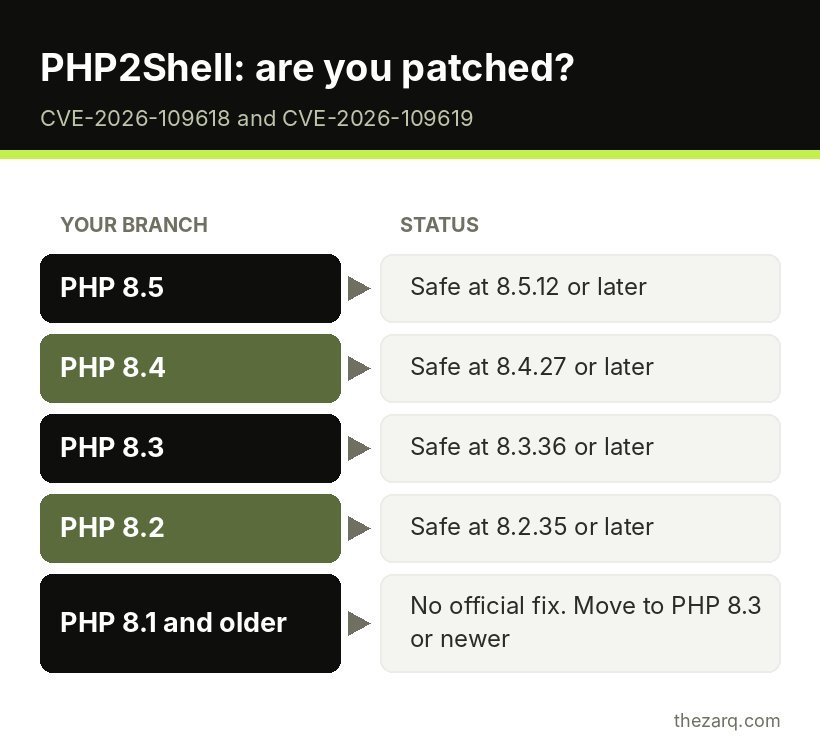
| PHP branch | Safe from PHP2Shell at |
|---|---|
| PHP 8.5 | 8.5.12 or later |
| PHP 8.4 | 8.4.27 or later |
| PHP 8.3 | 8.3.36 or later |
| PHP 8.2 | 8.2.35 or later |
| PHP 7.4 to 8.1 | No official release. These versions are end of life. Source code backports exist only for people who compile PHP themselves. |
| PHP 5.4 to 7.3 | No fix from PHP at all |
One important detail: many Linux distributions and hosting companies use their own PHP packages. Those vendors received patches before the public release, so a server can be patched even if the version number does not exactly match the table. If your host says it has patched, ask them to confirm it in writing.
Timeline: why “patch now” matters
- October 17, 2026: Amazon Threat Intelligence recorded an exploitation attempt against its honeypots, four days before public disclosure.
- October 20: CVE numbers and an advance notice from PHP appeared.
- October 21: PHP released the fixes.
- October 24: A researcher reported successful attacks against test servers running PHP 8.4.26 under mod_php.
- October 26: CISA added both flaws to its Known Exploited Vulnerabilities catalog and gave US federal agencies until October 29 to patch. Trail of Bits reported working exploits against unpatched PHP 8.2 through 8.5.
Because attacks started before disclosure, security teams recommend reviewing your logs from at least October 17, not from the day you patched.
Step 1: Check your PHP version in WordPress
You do not need server access for this.
- Log in to your WordPress dashboard.
- Go to Tools > Site Health.
- Click the Info tab.
- Open the Server section.
- Look at PHP version.
Write down the full version number, for example 8.3.35 or 8.4.27. The last number matters here.
You can also check in your hosting control panel. Most panels show the PHP version on the website’s dashboard or in a section called PHP Configuration, PHP Settings or Select PHP Version.
As a real example, when I checked the server behind this site after the patches came out, it reported PHP 8.5.12, which is the fixed release for the 8.5 branch. That took about thirty seconds.
Step 2: Update PHP (the only complete fix)
How you update depends on your hosting.
Shared or managed WordPress hosting
Most site owners are here. Your host controls the PHP binaries.
- Check your host’s status page, blog or email for a PHP2Shell notice. Many hosts patch their PHP packages centrally.
- If your version number is lower than the safe version for your branch, open a support ticket and ask: “Has PHP on my server been patched for CVE-2026-109618 and CVE-2026-109619?”
- If your site is on PHP 8.1 or older, use the control panel’s PHP version selector to move to PHP 8.3 or newer. There is no official fix for older versions.
Before switching PHP versions, take a full backup and test the site afterwards. Old plugins and themes sometimes break on newer PHP. Turn on your host’s staging site feature if it has one and test there first.
VPS or dedicated server
If you manage the server yourself:
- Update PHP through your distribution’s package manager, or upgrade to the fixed upstream release.
- Restart PHP afterwards. This is the step people forget. Installing new packages does not patch PHP workers that are already running. Restart PHP-FPM, Apache or LiteSpeed so the new code is actually loaded.
- If you use a third-party PHP repository, check that it has published patched builds. One popular volunteer repository had no updates on the day of disclosure.
Docker and containers
Rebuild your images on a patched base image and redeploy. Updating the host operating system does not update PHP inside containers.
Step 3: If you cannot update today
Updating is the only real fix. If you must wait a few hours for a maintenance window, these settings reduce exposure but do not make the server safe:
- For CVE-2026-109618: set
memory_limit=-1in php.ini and make sure applications cannot override it. Be careful: on a busy server this removes PHP’s memory safety net, so use container or system memory limits as a backstop. - For CVE-2026-109619: set
session.upload_progress.enabled=0. On PHP 8.5, also setfatal_error_backtraces=0. - If your site is behind Cloudflare, Cloudflare says it has deployed WAF rules for the known exploit methods. These only protect traffic that goes through Cloudflare.
On shared hosting you usually cannot change these settings for the whole server, which is another reason to push your host for a confirmed patch.
Step 4: Check whether your site was already compromised
Because exploitation started before the patch, it is worth a quick health check even after updating. Signs to look for in WordPress:
- New admin users you do not recognize under Users > All Users. Filter by Administrator.
- Unknown PHP files in
wp-content/uploads. That folder should contain images and documents, not.phpfiles. - Recently modified core files, especially
wp-config.php,index.phpand files in the theme folder. Your file manager or security plugin can sort by date modified. - Strange scheduled tasks. A plugin like WP Crontrol lists WordPress cron events. Look for ones you cannot explain.
- Spam pages or redirects that appear in Google results for your domain, or visitors reporting being sent to other sites.
- Unexpected outbound traffic or CPU spikes in your hosting stats.
Run a malware scan with your security plugin or your host’s scanner. If you find anything suspicious:
- Put the site in maintenance mode.
- Restore from a clean backup taken before October 17 if possible, then update PHP before bringing it back online.
- Change all passwords: WordPress admins, hosting account, database, FTP and SFTP.
- Regenerate the security keys and salts in
wp-config.php. - Re-scan after cleanup.
If you manage a server and see signs of probing, security experts at Google Cloud and Mandiant recommend capturing PHP worker memory before restarting, because a restart erases evidence. Most small site owners will not do this, but it matters for businesses that may need a forensic investigation.
A known side effect of the patch
PHP 8.4.27 and 8.5.12 can crash some applications that use the SimpleXML extension, due to a separate garbage collector fix in the same release. A fix has been merged by PHP but was not released as of October 26. If your site shows errors in features that read XML (some feed importers, sitemap tools or payment integrations), check the PHP error log and let your developer or host know. Do not roll back to a vulnerable version to work around it.
Hardening your WordPress site going forward
PHP2Shell is a reminder that WordPress security is not only about plugins. A few habits make the next incident far less stressful:
- Stay on a supported PHP version. Check the PHP version once a quarter and keep within branches that still receive security fixes.
- Use a host that patches quickly and tells customers when it has done so.
- Keep off-site backups with at least 30 days of history, so you can restore to a point before an attack.
- Use strong, unique passwords and two-factor authentication for WordPress and hosting logins.
- Remove plugins and themes you do not use. Less code means fewer ways in.
- Put the site behind a web application firewall such as Cloudflare or your host’s own firewall.
Official sources and further reading
These are the primary sources and security write-ups this guide is based on. The PHP project’s own advisories are the final word on versions.
- PHP2Shell frequently asked questions (Tenable)
- PHP2Shell: Critical PHP vulnerabilities patched, update now (Help Net Security)
- CISA confirms active exploitation of two PHP2Shell flaws (The Hacker News)
Frequently asked questions
Does PHP2Shell affect WordPress?
Yes, indirectly. PHP2Shell is a vulnerability in PHP itself, and WordPress runs on PHP. Any WordPress site on an unpatched PHP version that serves web requests is exposed, even if WordPress, themes and plugins are fully updated.
How do I check my PHP version in WordPress?
Go to Tools > Site Health in your dashboard, open the Info tab, and expand the Server section. The PHP version is listed there. You can also find it in your hosting control panel.
Which PHP versions fix PHP2Shell?
PHP 8.5.12, 8.4.27, 8.3.36 and 8.2.35 fix both vulnerabilities in their branches. PHP 8.1 and older do not have official fixed releases, so sites on those versions should move to PHP 8.3 or newer. Some hosts and Linux distributions ship patched packages with different version numbers.
Is my site safe if I updated PHP but did not restart it?
No. Installing updated packages does not patch PHP processes that are already running. PHP-FPM, Apache or LiteSpeed must be restarted to load the fixed code. On shared hosting, your host handles this.
How do I know if my WordPress site was hacked through PHP2Shell?
Look for unknown admin users, PHP files inside wp-content/uploads, recently changed core files, odd scheduled tasks, spam pages in search results and unusual server load. Run a malware scan and review logs from October 17, 2026 onwards, since attacks began before the public disclosure.
Last reviewed on October 31, 2026. Found something outdated or a step that did not work for you? Tell me and I will update the guide.