OLED MacBook Pro vs Mini-LED: Is the $400 Touchscreen Upgrade Worth It?
Same M5 Pro chip, same ports, same battery rating. The OLED model adds touch, a brighter screen and a lighter body for $400 more. Here is how to decide.
Usama Karim· 9 min read
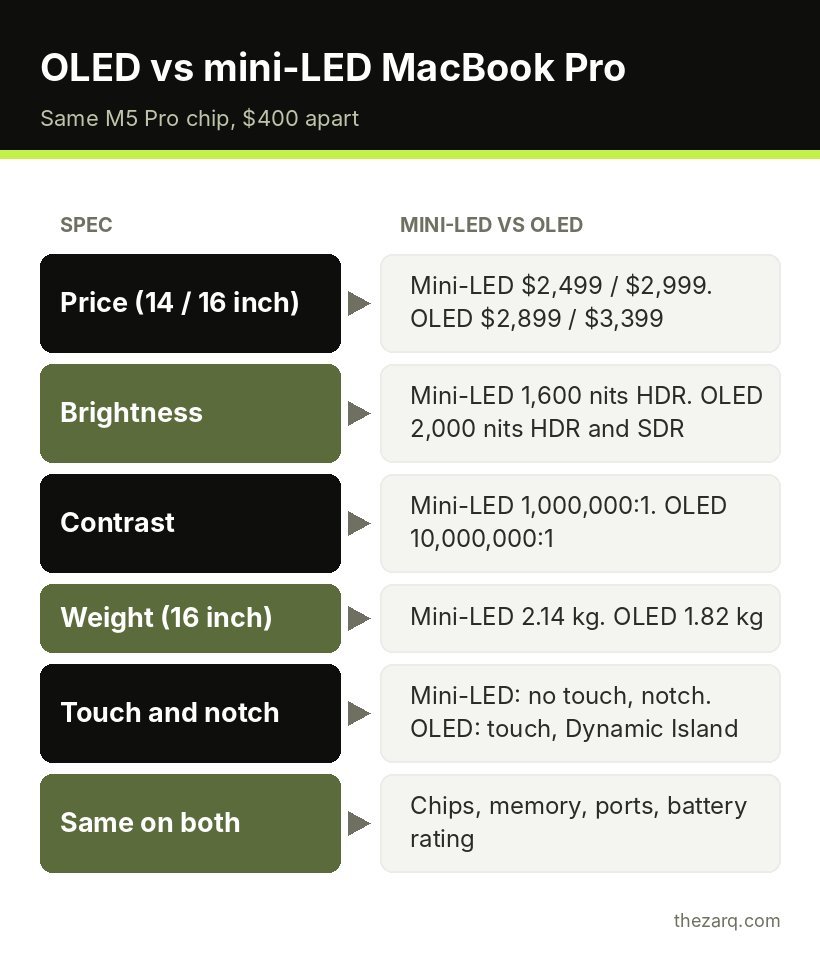
Quick answer: The new MacBook Pro with the PROLED XDR (OLED) display costs $400 more than the mini-LED model with the same M5 Pro chip: $2,899 vs $2,499 for the 14-inch and $3,399 vs $2,999 for the 16-inch. For that money you get touch, a brighter and higher contrast screen, a Dynamic Island instead of the notch, deeper bass and a noticeably lighter body. Chips, ports, memory and Apple’s battery ratings are the same. Buy the OLED model if you use the laptop’s own screen a lot and carry it every day. Buy the mini-LED model if it mostly sits on a desk connected to a monitor, especially if you find it discounted.
Apple’s October 28 announcement gave the MacBook Pro its biggest change in years: a tandem OLED screen Apple calls PROLED XDR, and, for the first time on any Mac, touch. Pre-orders are open now and the new models arrive on November 6, 2026.
The catch is that Apple did not replace the existing mini-LED MacBook Pro. It still sells it, with the same M5 Pro and M5 Max chips, for less. So if you are buying a MacBook Pro this season, you are choosing between two laptops that are identical inside and very different on the outside.
This guide is based on Apple’s published specifications and pricing plus early reporting from the launch. I have not had a review unit, so where something needs real-world testing (like how useful touch feels day to day), I say so rather than guess.
The lineup at a glance
There are now three kinds of MacBook Pro on sale:
| Model | Display | Chip | Starting price (US) |
|---|---|---|---|
| 14-inch MacBook Pro | Mini-LED (Liquid Retina XDR) | M6 | $1,999 |
| 14-inch MacBook Pro | Mini-LED (Liquid Retina XDR) | M5 Pro | $2,499 |
| 16-inch MacBook Pro | Mini-LED (Liquid Retina XDR) | M5 Pro | $2,999 |
| 14-inch MacBook Pro | PROLED XDR (OLED, touch) | M5 Pro | $2,899 |
| 16-inch MacBook Pro | PROLED XDR (OLED, touch) | M5 Pro | $3,399 |
M5 Max versions exist in both display types. The OLED M5 Max models start at $4,499 (14-inch) and $4,799 (16-inch). A fully loaded 16-inch OLED model with M5 Max, 128GB of memory and 16TB of storage reaches $14,549.
The base M6 model is the odd one out. It uses the newer M6 chip but is aimed at people who do not need Pro or Max performance, and it has Thunderbolt 4 ports rather than Thunderbolt 5. If you are not editing video or running heavy development workloads, it is worth looking at before either of the M5 Pro models.
What is the same on both models
This is the part that makes the decision interesting. When you compare an OLED and a mini-LED MacBook Pro with the same chip, these are identical:
- Chips: the same M5 Pro and M5 Max options, with the same CPU and GPU core counts.
- Memory: the same configurations and memory bandwidth.
- Ports: three Thunderbolt 5 ports, HDMI, SDXC card slot, MagSafe and a headphone jack.
- External displays: up to three with M5 Pro and up to four with M5 Max, plus the built-in screen.
- Wireless: Wi-Fi 7 and Bluetooth 6.
- Webcam: a 12MP Center Stage camera (the OLED model adds stabilization for when you touch the screen during calls).
- Battery ratings: Apple quotes up to 24 hours on the 16-inch M5 Pro for both display types, and the same figures across the matching configurations.
In other words, the OLED model is not faster. If your work is limited by processing power, rendering time or memory, the extra $400 does nothing for it.
What the extra $400 actually buys
A better screen
The PROLED XDR display is the headline. Apple’s numbers against the mini-LED Liquid Retina XDR:
| Mini-LED (Liquid Retina XDR) | OLED (PROLED XDR) | |
|---|---|---|
| Peak HDR brightness | 1,600 nits | 2,000 nits |
| Outdoor SDR brightness | 1,000 nits | 2,000 nits |
| Contrast ratio | 1,000,000:1 | 10,000,000:1 |
| Color | P3 | P3 and Adobe RGB |
| Refresh rate | ProMotion up to 120Hz | ProMotion 10Hz to 120Hz |
| Size (14 / 16 inch) | 14.2″ / 16.2″ | 14.2″ / 16.3″ |
Two of these matter more than the rest for everyday use.
Outdoor brightness doubles. 2,000 nits for normal (SDR) content means the screen should be far easier to read near a window, on a train or outside. Mini-LED MacBooks are already bright indoors, so this mostly helps people who work in mixed light.
Contrast and blooming. Mini-LED screens light the image with thousands of tiny zones. Bright objects on dark backgrounds can show a faint glow around them, often called blooming. OLED controls every pixel individually, so blacks stay black right next to bright text. If you watch a lot of HDR video, edit photos with dark scenes, or simply use dark mode, this is the most visible upgrade.
Adobe RGB support will matter to photographers and print designers who work in that color space. Most people will never notice it.
One detail worth knowing: Apple quotes sustained full-screen HDR brightness of up to 1,000 nits on the OLED model below 25°C. That is the same sustained figure as mini-LED, so the brightness gain is mainly in highlights and in SDR use, not in long stretches of full-screen HDR.
Touch
This is the first Mac with a touchscreen. The touch layer is built into the display panel, and Apple redesigned the hinge so the screen does not wobble when you tap it. It runs on macOS 27 (Golden Gate), which adds bigger window controls when you touch them, swipe to scroll, pinch to zoom and drag. Many existing apps work with touch automatically, and developers have new gesture APIs to build on.
Apple also says touch can be turned off if you do not want it.
Is it useful? That is genuinely unknown until people live with it. Windows laptops have had touchscreens for years, and many owners use them for quick scrolling and tapping buttons rather than as their main input. The MacBook Pro is still a clamshell laptop, not a tablet, so it does not fold back. I would not pay $400 for touch alone. Treat it as a bonus that comes with the better screen.
A lighter, thinner body
This is the most underrated difference, especially on the 16-inch.
| Mini-LED | OLED | |
|---|---|---|
| 14-inch weight (M5 Pro) | 1.60 kg | 1.38 kg |
| 16-inch weight (M5 Pro) | 2.14 kg | 1.82 kg |
| 14-inch thickness | 1.55 cm | 1.50 cm |
| 16-inch thickness | 1.68 cm | 1.60 cm |
Apple puts the 14-inch OLED model at about 3 pounds and the 16-inch at about 4 pounds. Losing roughly 0.3 kg on the 16-inch is the difference between a laptop that feels heavy in a backpack and one that does not. If you carry a 16-inch every day, this alone might justify the price.
Dynamic Island, speakers and the small stuff
- Dynamic Island: the notch is replaced by a Dynamic Island that shows Spotlight, Live Activities and Siri, like on iPhone.
- Speakers: six speakers on both models, but Apple claims 50% deeper bass on the OLED model, plus tuning for when the lid is closed and you use an external display.
- Storage ceiling: OLED M5 Max models go up to 16TB of storage, versus 8TB on mini-LED.
- Glowing Apple logo: purely cosmetic.
Things to watch out for
Nano-texture costs more. The anti-glare nano-texture glass is optional on both and reported at $150 extra on the OLED model.
OLED burn-in questions. OLED panels can, in theory, keep a faint ghost of static elements like the menu bar after very long use. Apple has used OLED in iPhones, iPads and Apple Watch for years, and its tandem OLED design is meant to reduce wear, but laptops show static menus and docks for hours. We will not know how this display ages until it has been in people’s hands for a year or more. If you keep laptops for five years or longer, it is a reasonable thing to weigh.
First-generation hardware. A new display, new hinge and new touch layer is a lot of change in one product. First-generation designs sometimes have small issues that get fixed in the next revision. The mini-LED design, by contrast, is mature.
Discounts favor mini-LED. Because the mini-LED model has been on sale for a while, retailers are already discounting it. At the time of writing, the 14-inch M5 Pro mini-LED model was listed at $2,289 at Amazon and B&H, which widens the gap to the OLED model to about $610. Prices change daily, so check before you buy.
Who should buy which model
Buy the OLED MacBook Pro if:
- You work on the laptop screen itself for most of the day, not on an external monitor.
- You carry the laptop daily, especially if you want the 16-inch.
- You work in bright places or near windows.
- You edit HDR video or photos and want true blacks without blooming.
- You need more than 8TB of internal storage.
Buy the mini-LED MacBook Pro if:
- The laptop mostly sits on a desk connected to one or more monitors. You would be paying for a screen you rarely look at.
- Your work is limited by performance, not by the display. The chips are identical.
- You can find it discounted. A $600 saving buys a lot of extra storage or a good external display.
- You prefer proven hardware over a first-generation design.
Consider the M6 MacBook Pro if:
- You want a Pro laptop for general work, coding, photo editing and light video work.
- You do not need Thunderbolt 5 or the extra GPU cores of the M5 Pro.
- You would rather spend $1,999 than $2,499 or more.
Do not upgrade if:
- You already own an M5 Pro or M5 Max MacBook Pro and it works well for you. The performance is the same, and the screen alone is a lot to pay for unless touch, weight or brightness fixes a real daily problem.
How to choose the right configuration
Whichever display you pick, these choices matter more for long term value than the screen:
- Memory: memory cannot be upgraded later. If you run large projects, many browser tabs, virtual machines or local AI models, buy more than you need today.
- Storage: internal storage is fast but expensive. A good external Thunderbolt SSD is often a cheaper way to store large media libraries.
- Chip: M5 Pro is plenty for most professionals. M5 Max is for heavy GPU work like 3D, high-end video and large local AI models.
- Charger: check the included adapter for your configuration. Apple sells 70W, 96W and 140W adapters separately at $59, $79 and $99 if you want a spare or faster charging.
If your current laptop is struggling and you are weighing whether to replace it at all, my guide on why laptops overheat and how to fix them and the one on speeding up a slow PC cover the cheaper fixes worth trying first.
Official sources and further reading
The specifications and prices in this guide come from Apple’s announcement and launch coverage. Check Apple’s store for current pricing in your country before buying.
- Apple unveils groundbreaking MacBook Pro with PROLED XDR Display (Apple Newsroom)
- OLED vs. Standard MacBook Pro: Is the New Model Worth $400 More? (iClarified)
- MacBook Pro buyer’s guide and lineup (MacRumors)
Frequently asked questions
How much more does the OLED MacBook Pro cost?
The OLED (PROLED XDR) MacBook Pro costs $400 more than the mini-LED model with the same M5 Pro chip in the US. The 14-inch is $2,899 versus $2,499, and the 16-inch is $3,399 versus $2,999. Discounts on the older mini-LED model can make the gap bigger.
Is the OLED MacBook Pro faster than the mini-LED model?
No. Both use the same M5 Pro and M5 Max chips with the same CPU, GPU and memory options. The differences are the display, touch, weight, thickness, speakers, Dynamic Island and the maximum storage option.
When does the touchscreen MacBook Pro come out?
Pre-orders started on October 28, 2026, and Apple says the new MacBook Pro arrives with customers and in stores on Friday, November 6, 2026, in the US and many other countries.
Can you turn off touch on the new MacBook Pro?
Yes. Apple says touch input can be turned off for people who prefer to use only the keyboard and trackpad.
Does the OLED MacBook Pro have better battery life?
According to Apple’s ratings, battery life is the same as the matching mini-LED configuration, up to 24 hours on the 16-inch M5 Pro model. Real battery life depends on brightness, apps and workload.
Last reviewed on October 31, 2026. Found something outdated or a step that did not work for you? Tell me and I will update the guide.